


Item modifications have been an integral part of every pilot’s journey for the majority of Star Sonata’s life. The “Bindomite roulette” is something many of you are all too familiar with. We have been hinting at (and even writing full posts about) a new vision for item modifications for a very long time. After a concerted development push and a lot of help from the Paxian Disciples, we’re finally ready to announce the details of this project. Here is a breakdown of what you can expect from the finalized Modifications revamp, which is planned for release next month.
High Level: Neuroforging
The biggest feature of this revamp is the introduction of enhanced modifications via Neuroforging. Neuroforging allows you to take an item that is already neurobound and improve a single modification on that item. This is done by taking an unmodified copy of the same item and spending it to neuroenhance your chosen piece of gear. This opens up the brand new Neuroforging menu.
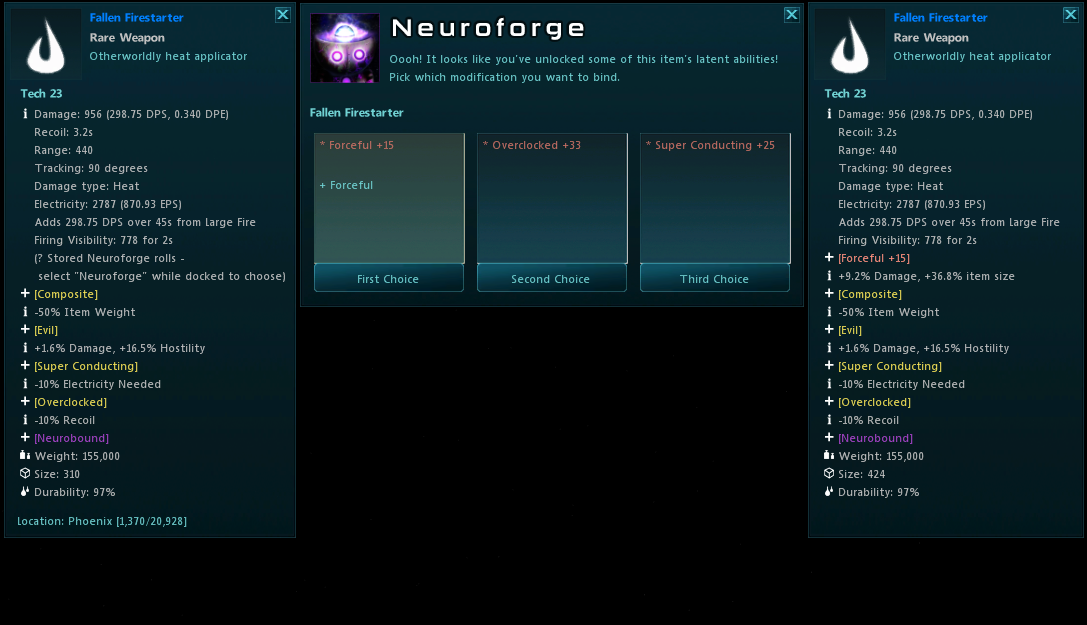
The Neuroforging menu gives you 3 semi-random options to pick from every time you neuroenhance an item. The first thing that may catch your eye are the pink modifications at the top of each selection, coupled with a +15 in the case of Forceful in the first option. This is an enhanced modification and is one of the key features of the modification revamp. Upon completing your first enhancement on a piece of gear, one of your modifications on that item will be enhanced.
Mid Level: Enhanced modifications
Let’s get a bit more detailed about enhanced modifications.
- Neuroforging is a process that can be done multiple times, but you can only ever have one enhanced modification at a time.
-
Enhanced modifications are coupled with an enhancement level. This tracks how much extra power above a basic version of the modification is being provided.
-
Some modifications get special benefits for being enhanced. These special benefits do not scale up their bonus with enhancement level.
-
Not all modifications are eligible to be enhanced.
-
Enhancement level has a cap, it’s not infinite!
-
The higher quality the item, the better it can become. Enhancement Cap and Total modification count scale with item quality.
Keep Rolling
So the basic flow of enhancing and modifying your gear is as follows: You neurobind a piece of gear. You grab another copy of that gear, and consume it to start neuroforging. Even though the item’s enhancement level has a cap, you can neuroforging an item an infinite number of times. This can do things like swap your enhanced modification, and add or swap “secondary” modifications in addition to its normal purpose of increasing your enhancement level. However, the middle option will always increase the bonus of your currently enhanced modification and not change anything else about the item. You could call it a “safe” roll.
What do I do with all of these items?
If you were a heavy user of the current modification system, then you likely have storage ships full of Bindomite-bound gear lying around. One aspect of this modification system is that all of those items are eligible to be used for neuroforging. Neurobound items can be used in forging, but the item must first have all modifications stripped from the item. We have implemented a system that allows any Bindomite-bound item to have all modifications stripped by using another Bindomite. You are allowed to either re-roll the item for a new set of modifications or use it as fodder for neuroforging.
Follow along with us
The Neuroforge update will have a lot more going on than just the addition of the Neuroforge. We will be posting follow-up blogs to detail what is being changed with the Neuroforge update. In the meantime, we are opening up access to our test server for players to try out the systems we have designed before they go live. The changes on this server encapsulate all of what the Neuroforge has to offer so far. There are plenty of class changes and other fancy things to explore as well.
You will need a totally different client to connect to this server. You will need to connect to “Test Server” using the Delta Client. You can get this client at the follow link: https://www.starsonata.com/dl/StarSonata_2_delta.exe
You can find the “Test Server” on the login screen by using the Server Drop down on the login screen end then selecting “Test Server.” For more information on how to use the test server or to provide your feedback, please use the Star Sonata community discord server.
Disclaimer: Anything on test servers are subject to change at any time and may not be representative of what will be seen when the live server is updated. The test server is subject to be shutdown, reset and restarted at any time.